insights WordPress Analytics Plugin

TrueAna: See what's truly happening in your WordPress site

Every reports inside WP Admin — Connect Google Analytics in few clicks. Get a real analytics dashboard inside your WP admin — no tag manager, no custom code, no switching tabs.

verified_user 7-day money-back guarantee star 5.0 / 5 from 30 reviews
TrueAna analytics dashboard showing sessions, revenue, and engagement charts
trending_up
+34.8%
Engagement rate
shopping_cart
312 orders
This month
group
12,840
Sessions
payments
$8,204
Revenue
extension All Features

Everything your WordPress site needs

Lightweight GA4 tracking, built-in analytics, WooCommerce reports, form tracking, and multi-platform integrations — all in one plugin.

link
Free
One-Click GA4 Connection
Link your GA4 property via OAuth in seconds. No manual code, no theme file edits. Measurement ID entry also supported.
bolt
Free
Lightweight & Performance-Safe
Uses async gtag.js with near-zero impact on page speed. No render-blocking, no layout shift.
people
Free
Audience Reports
Country, language, device category, and age group, with period-over-period comparison on core stats.
travel_explore
Free
Acquisition Reports
Default channel groups, exact source/medium pairs, and screen resolution breakdowns.
insights
Free
Behavior Reports
Top pages, average time on page, and demographic reports: age group, gender, and operating system.
widgets
Free
WordPress Dashboard Widgets
5 free widgets on your wp-admin home screen — overview chart, country, language, device, and quick stats.
shopping_cart
Free
WooCommerce Event Tracking
Fires view_item, add_to_cart, begin_checkout, purchase, and refund using the full GA4 e-commerce event schema — 30+ events total.
privacy_tip
Free
IP Anonymization (GDPR)
GDPR-compliant IP masking built in. Enable with one toggle — no code changes needed.
thumb_up
Free
Facebook Pixel Integration
Add your Meta Pixel ID and track PageView, ViewContent, AddToCart, and Purchase events — no code editing needed.
ads_click
Free
Google Ads Conversion Tracking
Add your Google Ads conversion label to fire a conversion event with revenue value and transaction ID on purchase.
block
Free
Admin Exclusion
Exclude administrator sessions from GA4 data automatically. Keep your analytics clean without manual filtering.
open_in_new
Free
Enhanced Link Attribution
Accurately differentiate between multiple links to the same URL on a single page.
article
Pro
Content Performance Reports
Author, category, tag, and post-type breakdowns, powered by 4 custom dimensions.
store
Pro
WooCommerce Conversion & Journey Reports
Product revenue, purchase funnel by device, source-based revenue, and region rankings.
subscriptions
Pro
WooCommerce Subscriptions Dashboard
MRR, ARR, churn rate, renewals, and subscriber lifecycle — 5 sub-tabs, computed directly from WooCommerce data.
sensors
Pro
Real-Time Reports
Live active users refreshed every 30 seconds, across 4 sub-tabs — Overview, Audience, Acquisitions, Behavior.
stacked_bar_chart
Pro
Google Ads & AdSense Reports
Ad impressions, clicks, and cost by campaign, search queries, and ad network split. AdSense revenue and clicks by page.
assignment
Pro
Form Conversion Reports
Views, submissions, and conversion rate per form — across 10 supported WordPress form plugins.
play_circle
Pro
Video Performance Reports
Starts, completions, completion rate, and average watch depth per video title — GA4-native, YouTube embeds.
tune
Pro
11 Custom Dimensions
Author, category, tag, post type, user role, user ID, form, and subscription data as GA4 custom dimensions.
table_chart
Pro
Custom Report Builder
Combine any dimension and metric, choose a chart type, filter, and pin the result as a dashboard tab.
security
Pro
5 More Ad Platform Pixels
Bing UET, TikTok, Pinterest, Snapchat, and LinkedIn Insight Tag.
mark_email_read
Pro
Scheduled Email Reports
Daily, weekly, or monthly HTML report emails, to any number of recipients.
ads_click
Pro
Click Tracking Reports
outbound link clicks and file downloads, with link URL, link text, file name, and the exact page each happened on.
flag
Pro
Campaign Performance Report
Sessions, engagement rate, conversions, and revenue broken down by campaign, source/medium, and term
search
Pro
Search Console Reports
landing page and query performance, monthly ranking trend, and device breakdown
format_list_bulleted
Pro
Integration Status
Track integration for your Google Analytics and Fix the issues before it arise.
bar_chartAnalytics Reports

3 free + 15 Pro dashboard tabs, built into WordPress

Audience, Acquisition, and Behavior are free. Content Performance, WooCommerce, Real-Time, Subscriptions, Ads, AdSense, Forms, Campaign Performance, Click Tracking, Video and Other Pro Reports all require Pro — switch between all of them without leaving WP Admin.

Report Sections
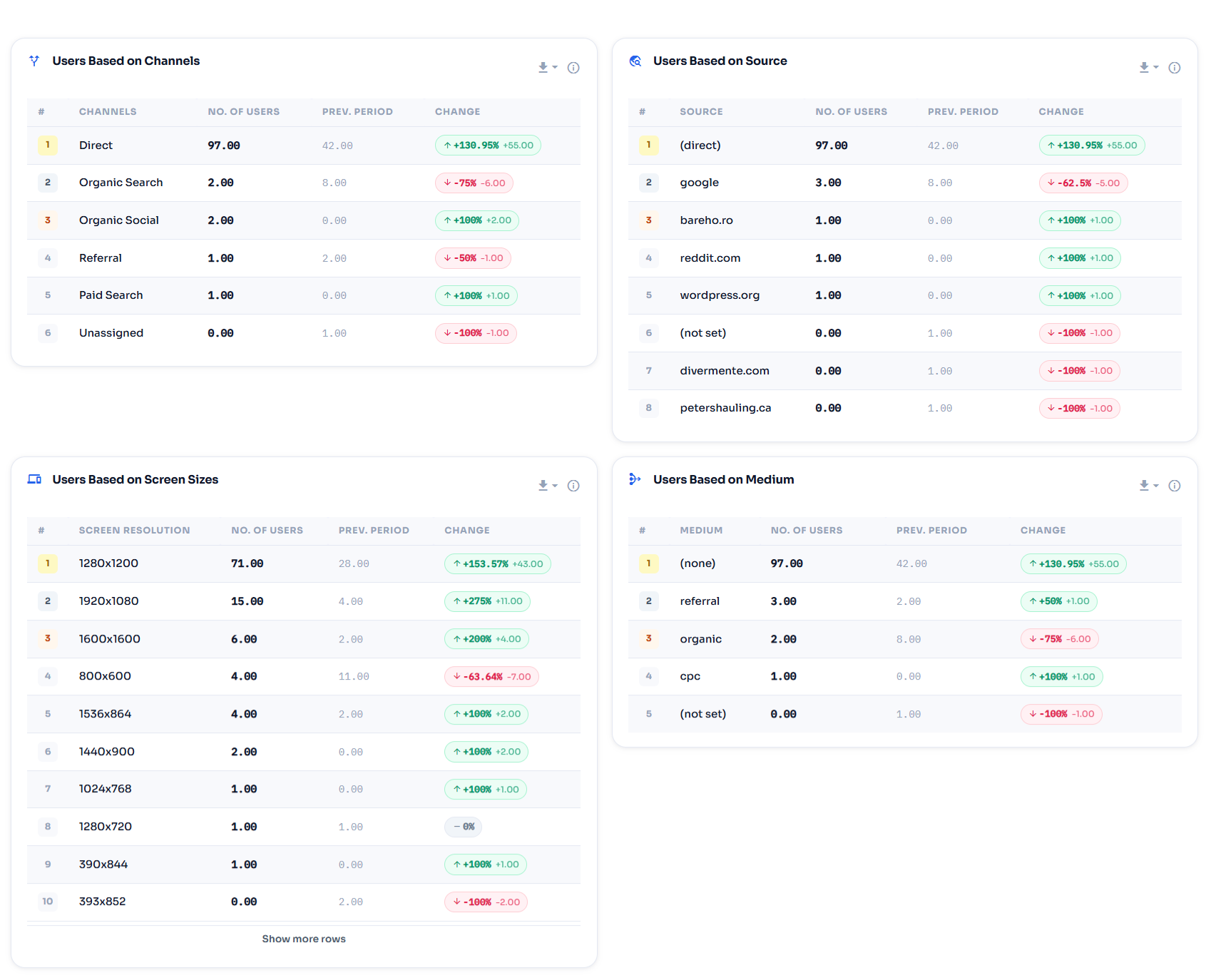
Acquisition Reports
Traffic channels, source/medium, and screen size breakdowns.
TrueAna ‹ Test V69 — WordPress 1
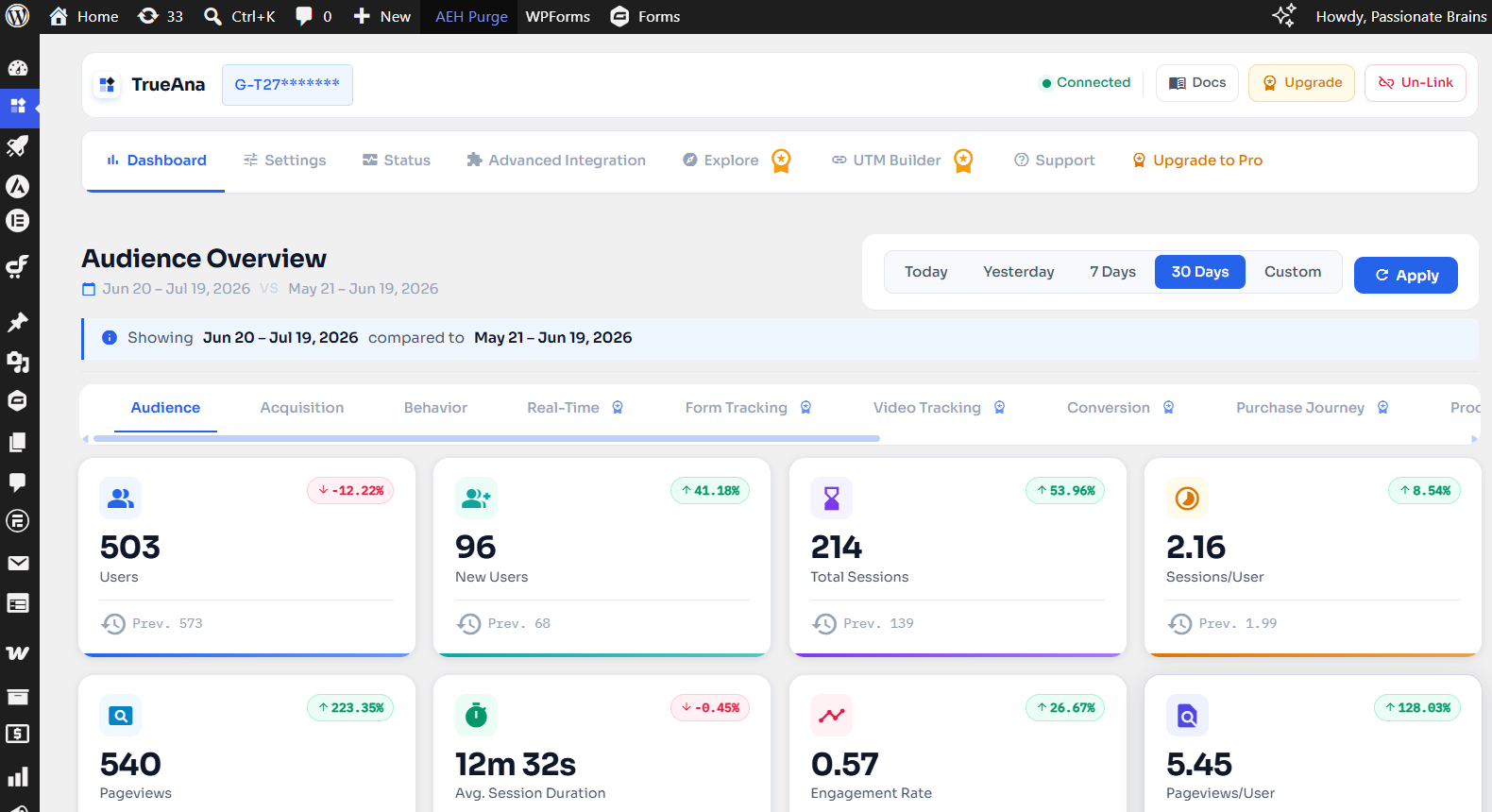
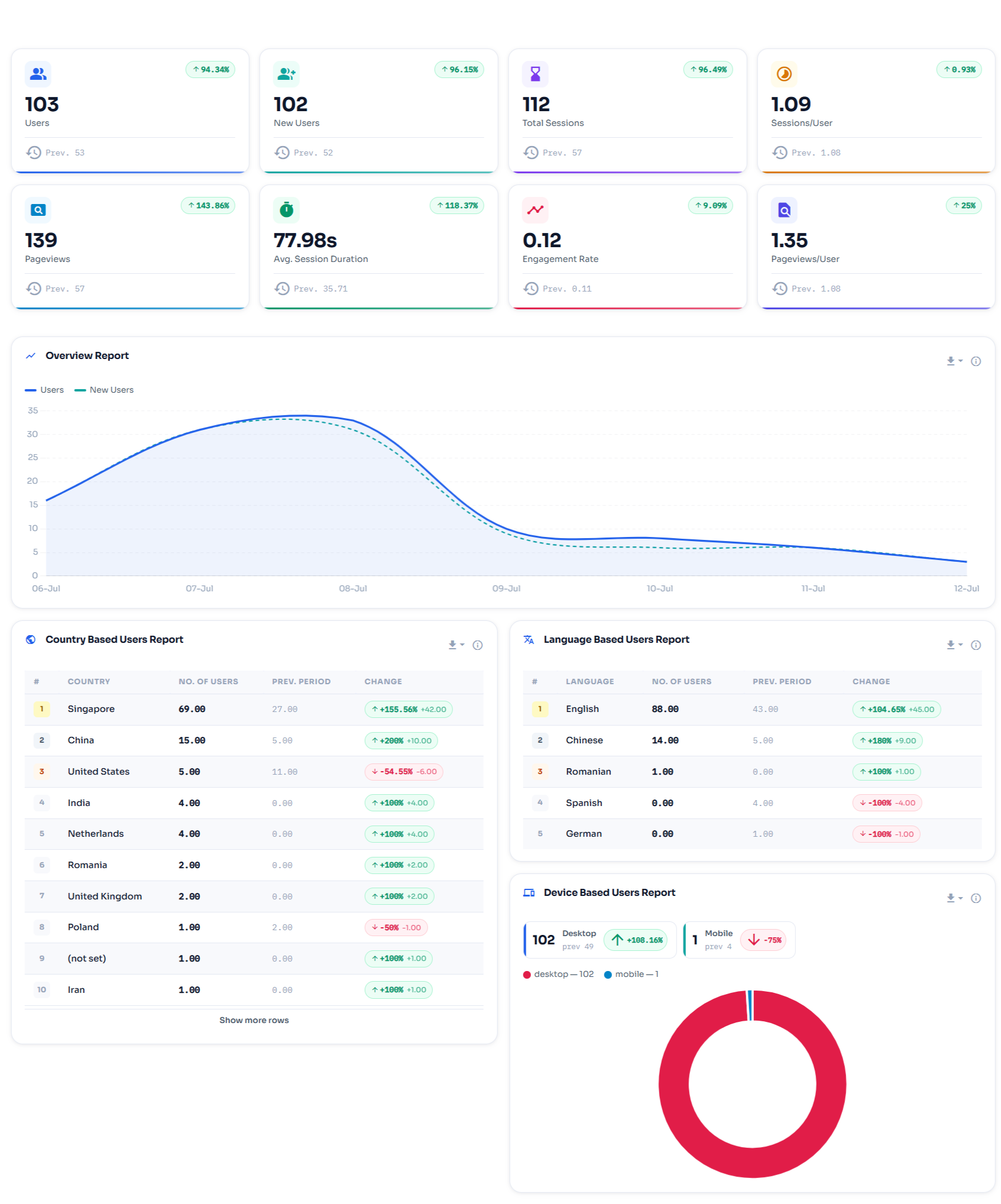
Audience Reports
Country, language, device, age group, and gender breakdowns with trend comparison.
TrueAna ‹ Test V69 — WordPress 2
Behavior Reports
Top pages, avg. time-on-page, age groups, OS, and gender breakdowns.
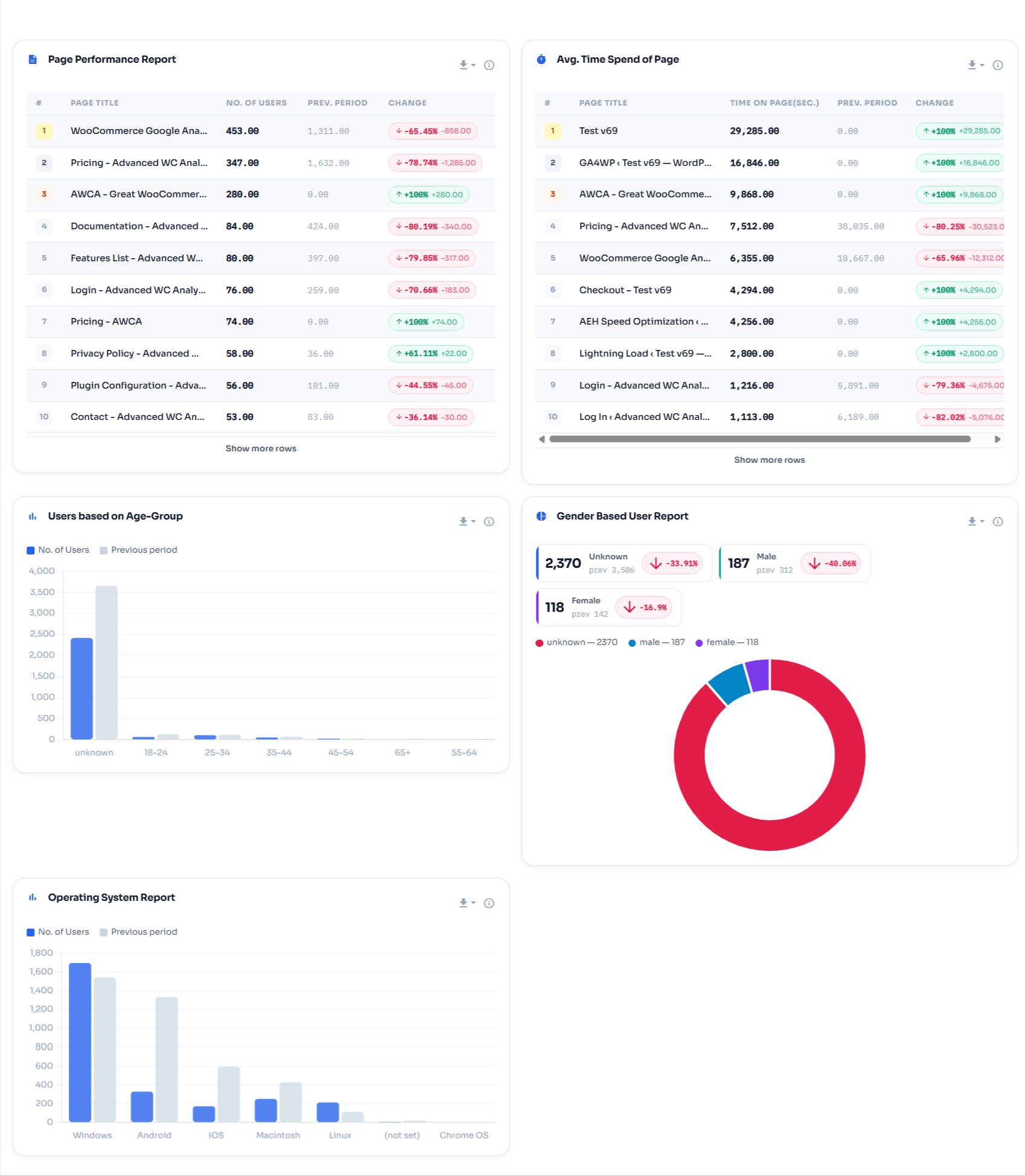
TrueAna ‹ Test V69 — WordPress 4
WooCommerce Report
Revenue, add-to-carts, orders, and conversion rate for the selected period.
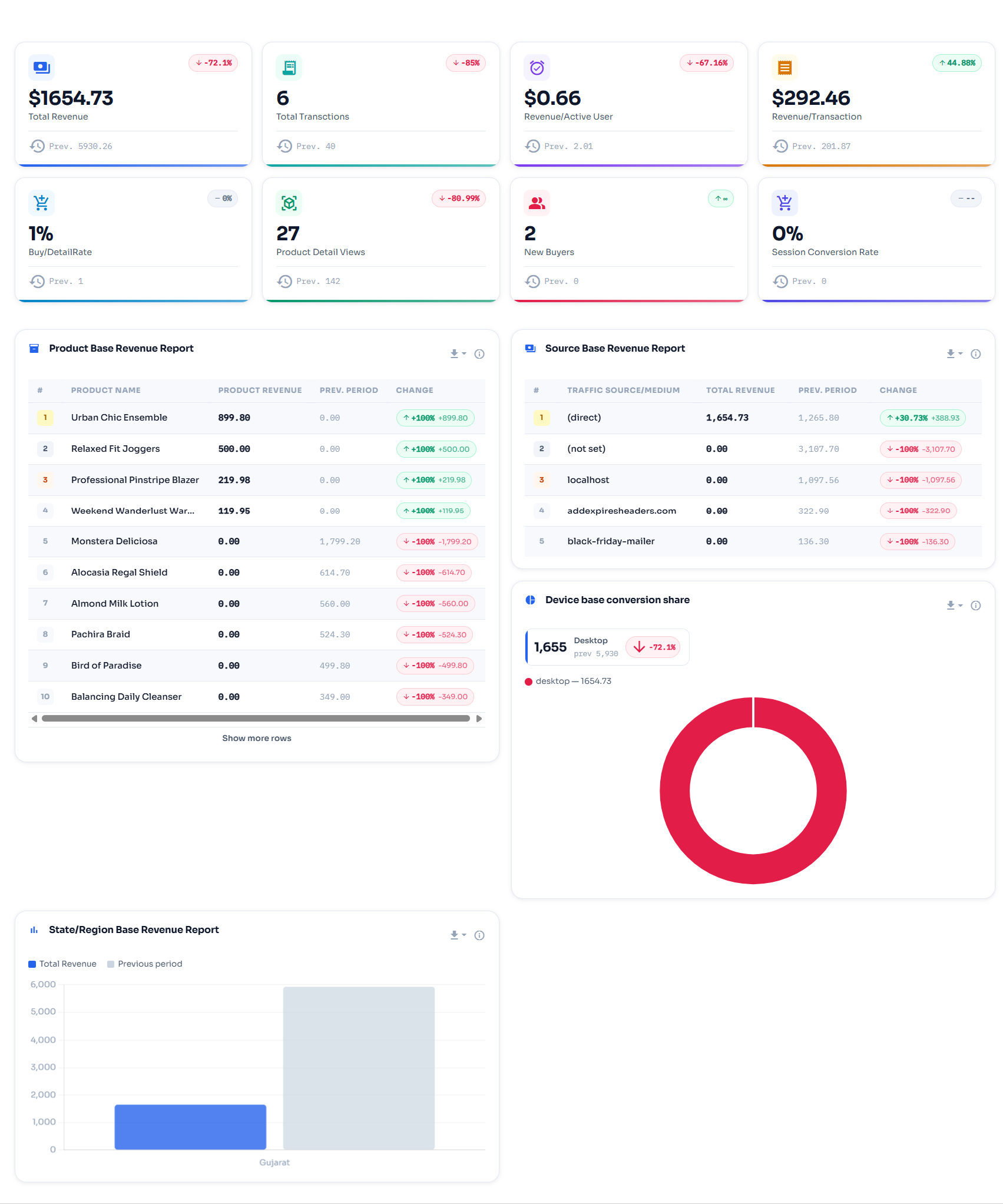
TrueAna ‹ Test V69 — WordPress 5
Google Ads Report
Clicks, ad cost, and per-page AdSense revenue vs. the previous period.
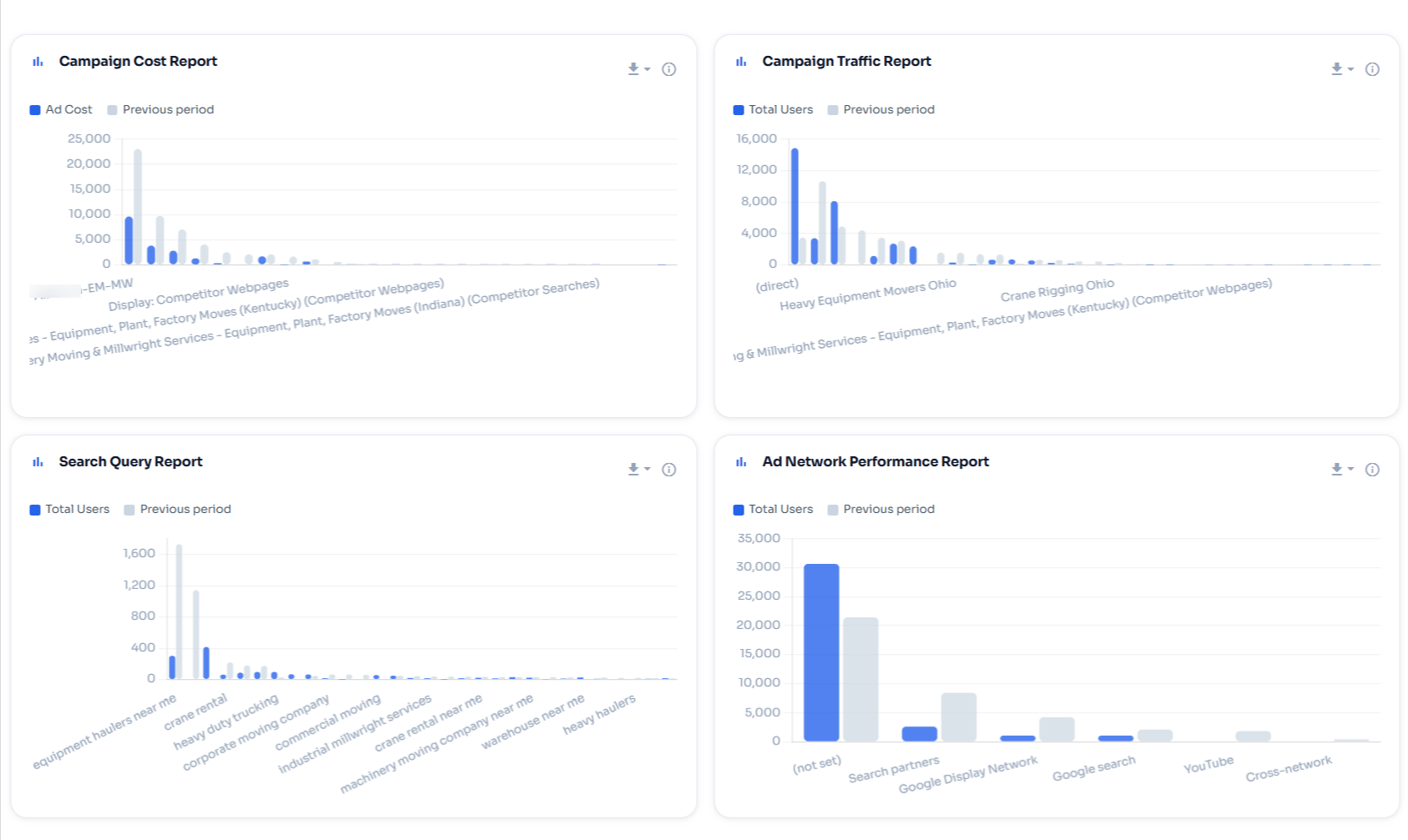
Google Ads
Google Ads Report
Clicks, ad cost, and per-page AdSense revenue vs. the previous period.
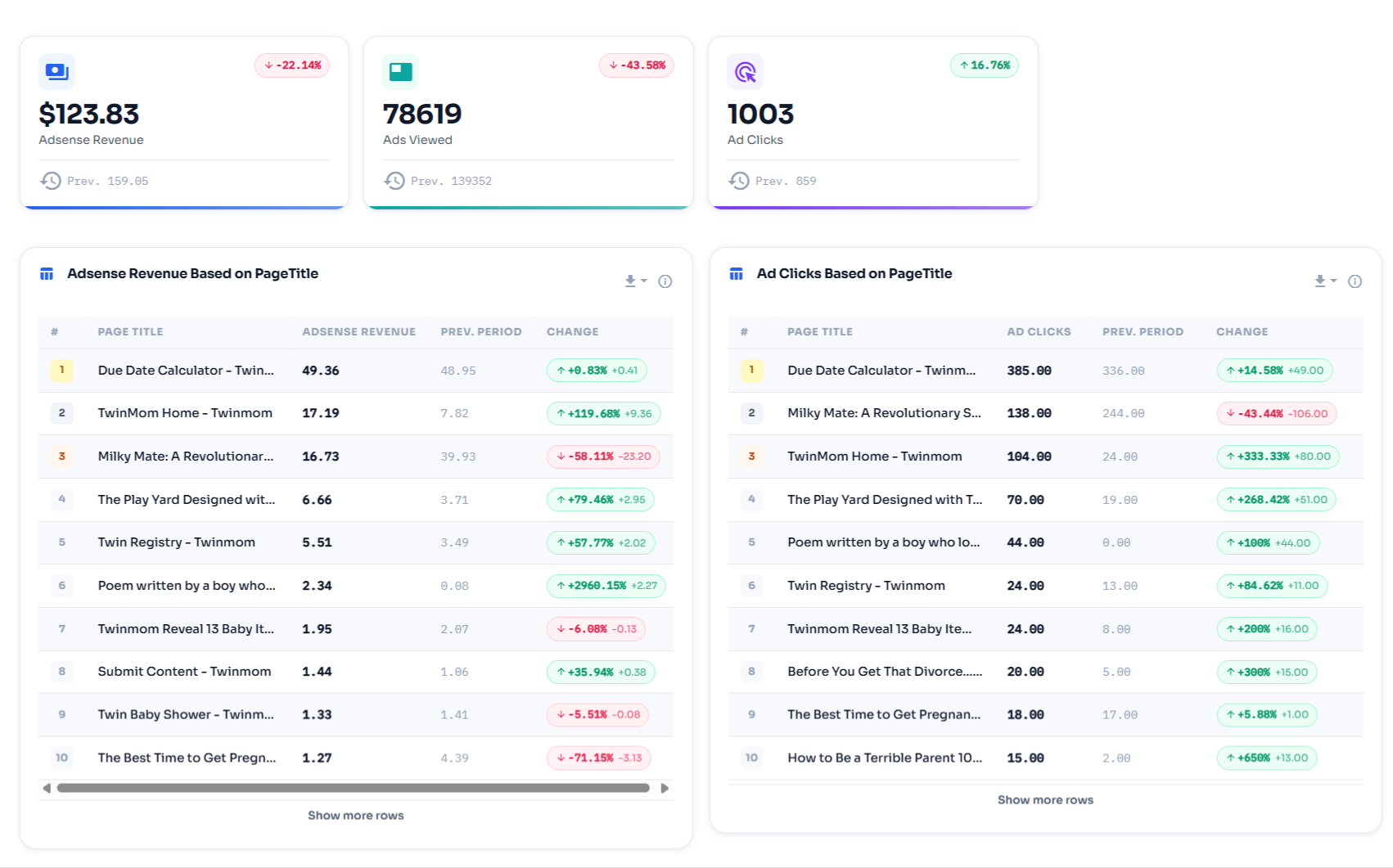
Google Adsense
Form Conversion Report
Views, submissions, and conversion rate per form — compared to the previous period.
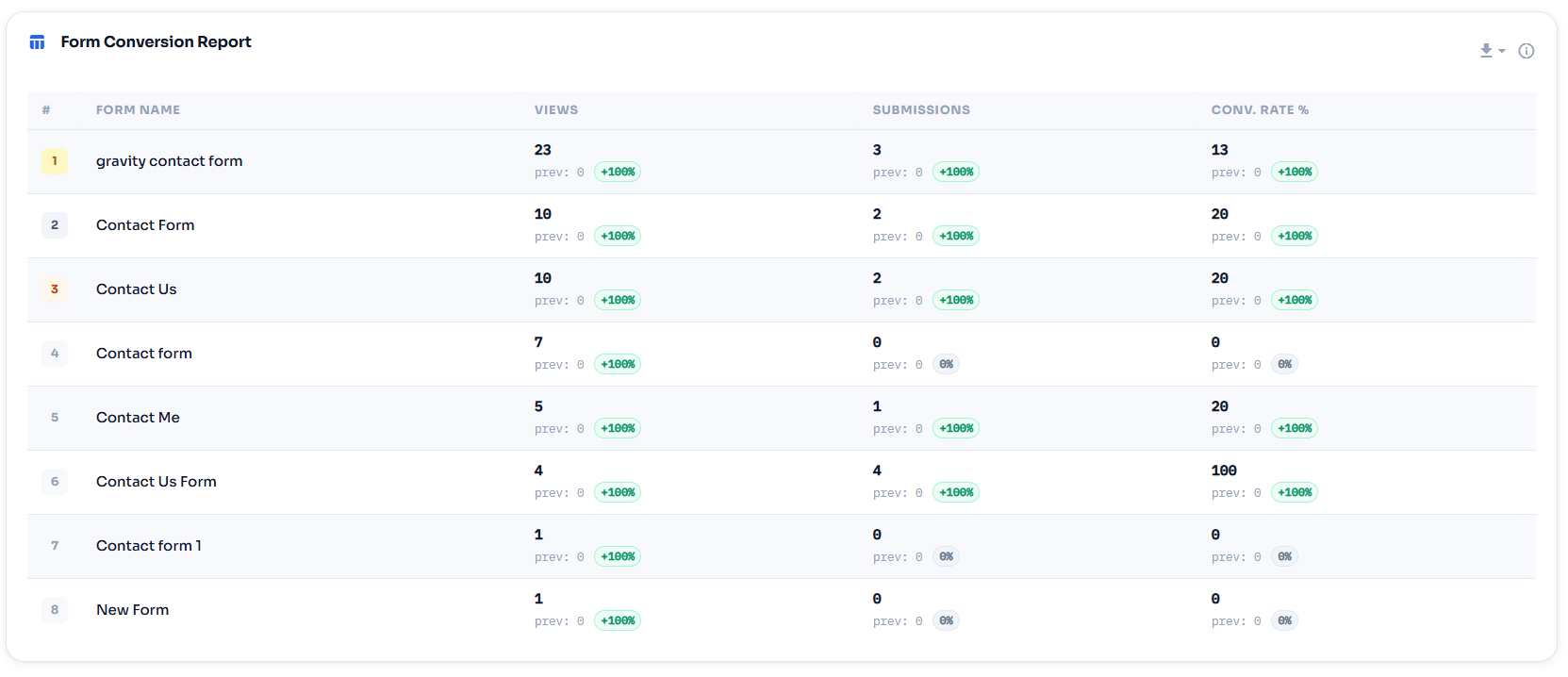
Screenshot 2026 07 14 004913
Video Performance Report
Video starts, completions, completion %, and average watch depth per title.
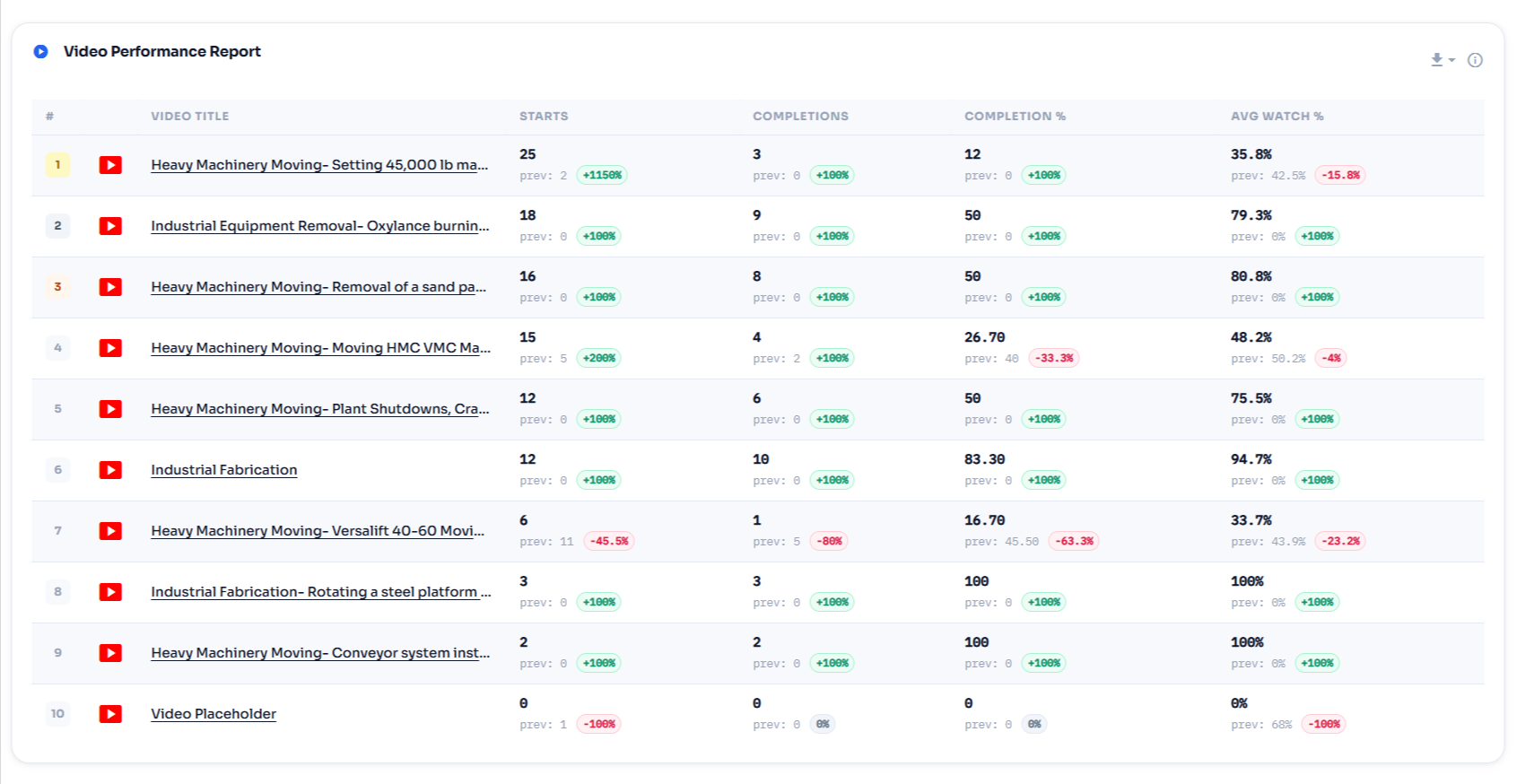
TrueAna ‹ Test V69 — WordPress 6
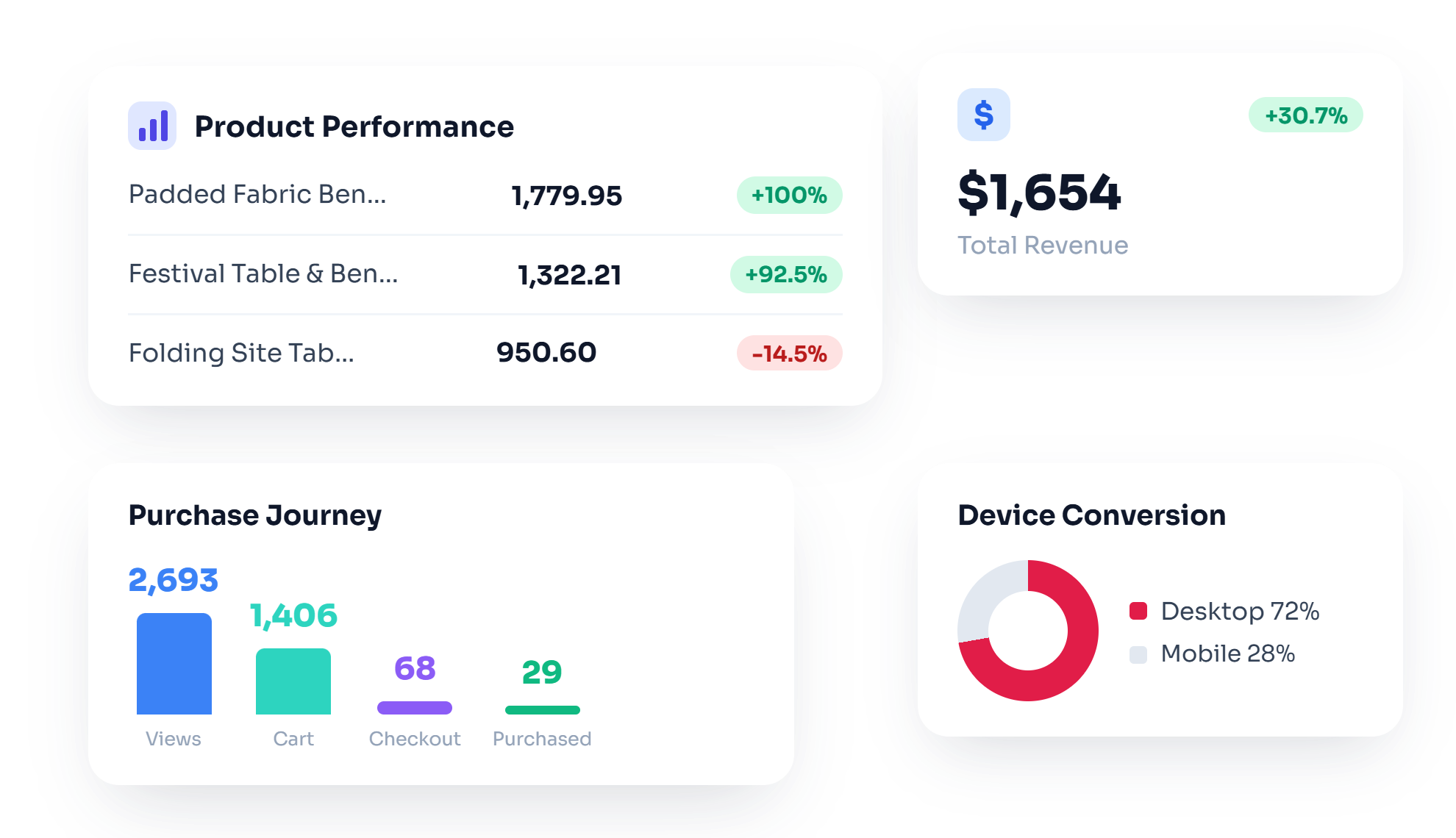
Product Performance Report
Find latest performance of your product in woocommerce store using this report.
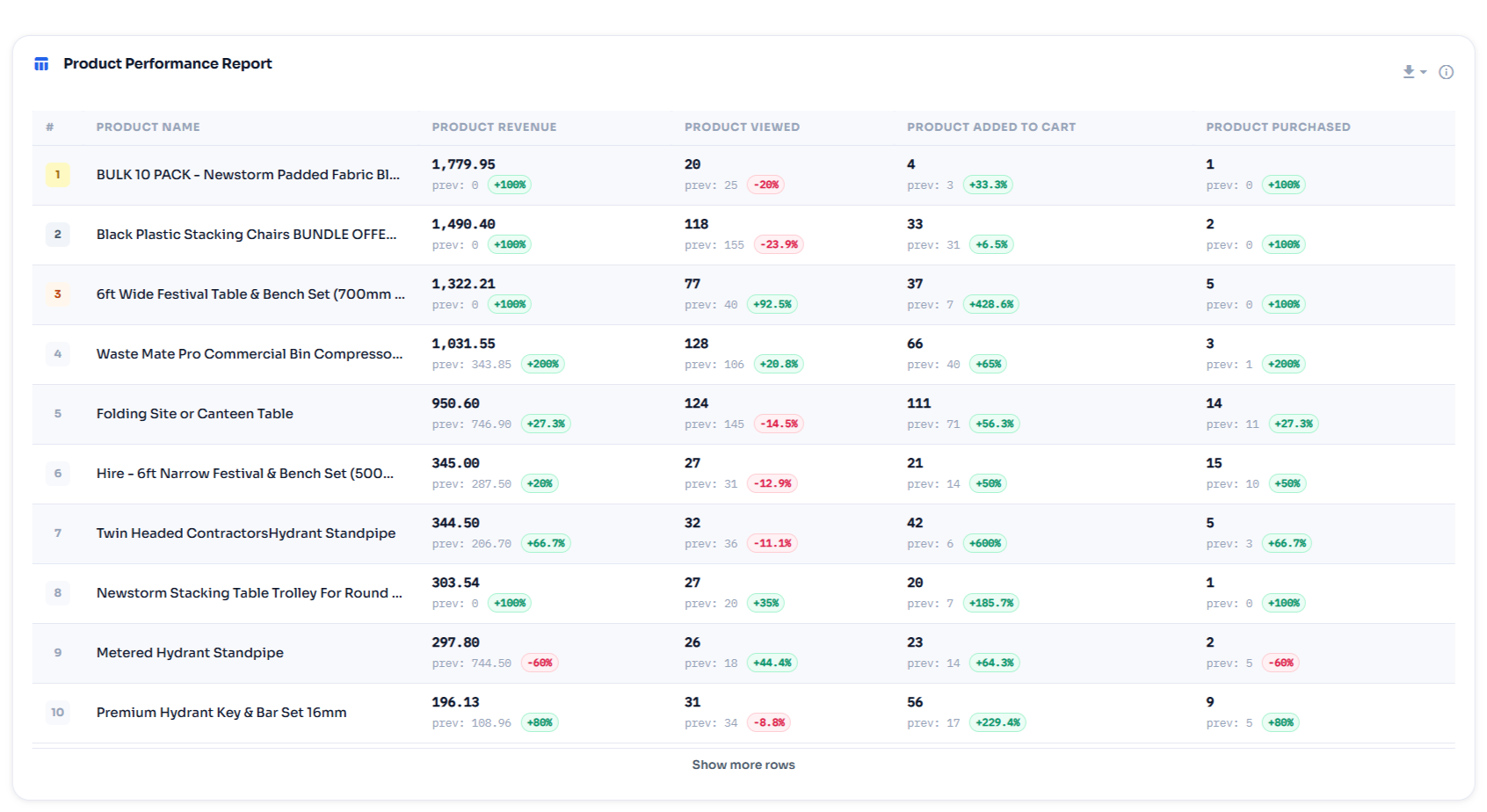
Performance
User Journey Report
Find how users purchasing product and what is cart drop off at various points in woocommece store.
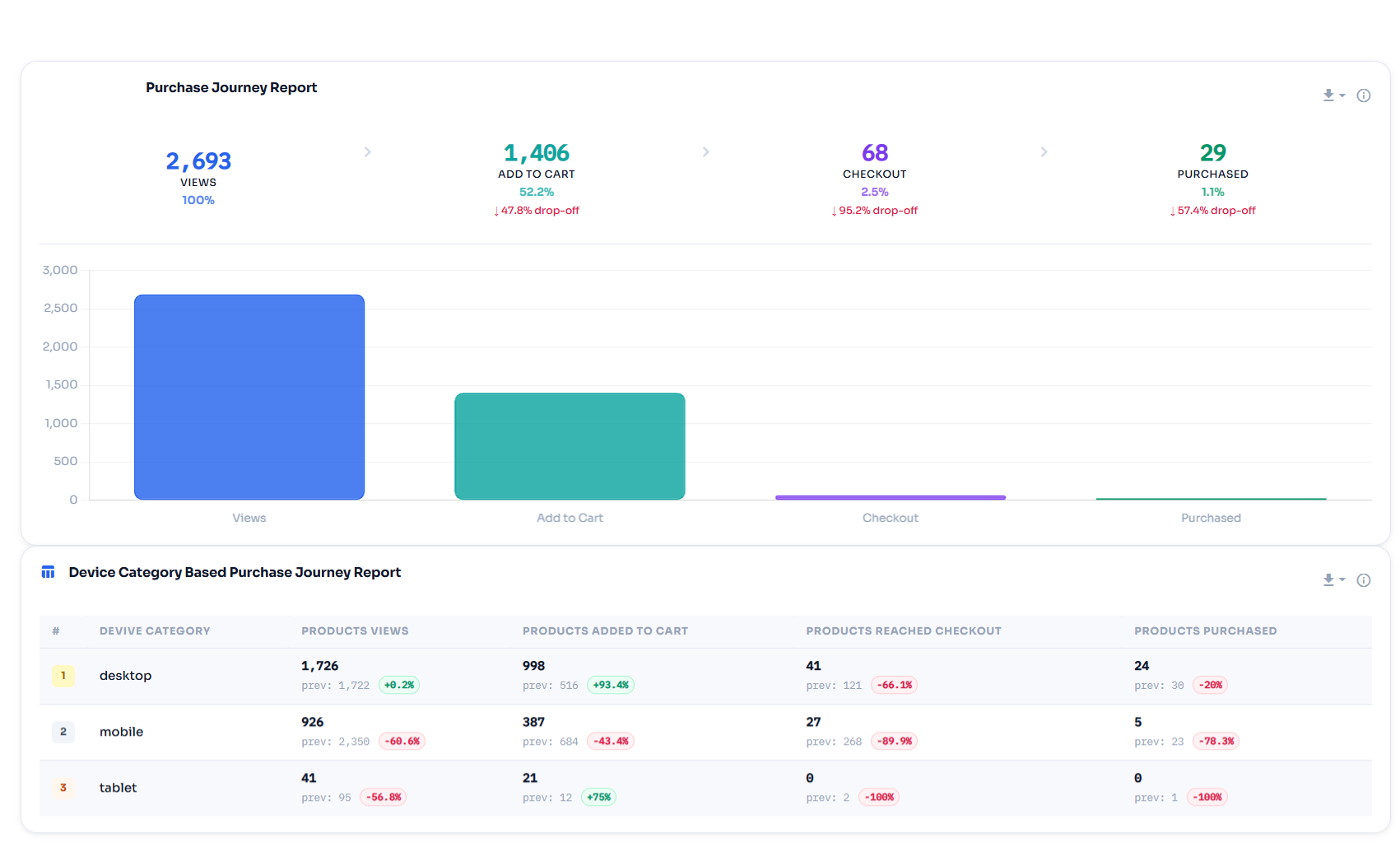
Journey
track_changesEvent Tracking

Every interaction, automatically tracked

TrueAna fires GA4-native events for forms, videos, WooCommerce, and integrations — no GTM, no custom code required.

assignment
Form Tracking
Views, submissions, and conversion rate per form across 10 supported WordPress form plugins.
CF7WPFormsGravityNinjaElementorDiviFluentMailchimpWS FormFormidable
play_circle
Video Tracking
Starts, completions, and watch depth. Built on GA4's own native video engagement tracking — enable Enhanced Measurement in your GA4 property.
YouTube (GA4-native)
shopping_cart
WooCommerce Events
Full GA4 e-commerce schema from product view to refund — 30+ events, fired automatically and free.
view_itemadd_to_cartpurchase
loop
WooCommerce Subscription Events
10 lifecycle events — created, renewed, cancelled, expired, and more — requires WooCommerce Subscriptions.
createdrenewedcancelled
account_tree
Enhanced Link Attribution
Accurately differentiate between multiple links to the same URL on one page.
Free
campaign
Facebook Pixel
PageView, ViewContent, AddToCart, and Purchase events — enter your Pixel ID and done.
PageViewAddToCartPurchase
ads_click
Google Ads Conversion
Add your Google Ads conversion label to fire a conversion event with revenue value and transaction ID.
Free
person_off
Admin Exclusion & IP Masking
Exclude admin sessions from data. Anonymize IPs for GDPR compliance — one toggle each, both free.
GDPRAdmin filterIP mask
hub Integrations

Connects with your entire stack

TrueAna integrates with the most popular WordPress plugins and ad platforms — setup takes seconds, not hours.

Each integration is configured directly inside the TrueAna settings panel. No separate plugins or code snippets required.

analytics
Google Analytics 4
Free · Core · OAuth + gtag.js
shopping_cart
WooCommerce
Free · 30+ e-commerce events
thumb_up
Facebook / Meta Pixel
Free · Pixel ID · Page & cart events
ads_click
Google Ads (Conversion Tag)
Free · Conversion tracking
attach_money
Google Ads (Reports Dashboard)
Pro · Cost, traffic & search query reports
payments
Google AdSense
Pro · Revenue by page reports
manage_search
Bing / Microsoft UET
Pro · UET tag · conversions
music_note
TikTok Pixel
Pro · Pixel code · ad performance
location_on
Pinterest Tag
Pro · Tag ID · retargeting
work
LinkedIn Insight Tag
Pro · Partner ID · B2B tracking
add_a_photo
Snapchat Pixel
Pro · Pixel ID · ad audiences
assignment
10 Form Plugins
Pro · CF7, WPForms, Gravity, Ninja, Elementor, Divi, Fluent, Mailchimp, WS Form, Formidable
subscriptions
WooCommerce Subscriptions
Pro · MRR, churn, retention dashboard
video_library
YouTube Embeds
Pro · GA4-native video engagement events
verified_user
Consnet Plugins
Google Consent Mode v2 supported
table_chart
Custom Report Builder
Pro · Any GA4 dimension + metric
tune Custom Dimensions · Pro

Richer data with custom dimensions

Send WordPress-specific attributes as GA4 custom dimensions. Each dimension can be toggled individually from the plugin settings.

person

Author

Track which author drives the most engaged traffic. Only fires on singular posts/pages.

category

Category

Segment traffic by WordPress category. Understand which content topics perform best.

label

Tag

Granular tagging data in GA4. Map engagement back to specific content tags.

article

Post Type

Differentiate between posts, pages, products, and custom post types in your GA4 data.

supervisor_account

User Role

Segment analytics by WordPress user role — subscriber, editor, customer — or 'guest' for logged-out visitors. Sent on every page; User-scoped.

fingerprint

User ID

Cross-device attribution for logged-in visitors, using a persistent WordPress user ID. User-scoped; only sent when logged in.

assignment

Form ID

Identifies which form on your site an event belongs to — powers the Form Conversion Report.

badge

Form Name

The human-readable form name, paired with Form ID for per-form breakdowns.

loop

Conversion Type

Distinguishes new vs. renewal vs. re-subscription purchases for WooCommerce Subscriptions.

subscriptions

Subscription ID

Identifies which subscription an event belongs to, for subscription-level reporting.

autorenew

Subscription Renewal Count

How many times a subscription has renewed — used in retention and churn analysis.

add

More Will Come Soon

We are working to improve plugin by adding more custom dimensions.

mark_email_read Email Reports · Pro

Analytics delivered to your inbox

Set it and forget it. Scheduled email reports bring your key metrics directly to you — no login required.

analytics TrueAna Weekly Report — yoursite.com
Users 8,412 ↑12.3%
Sessions 14,218 ↑8.7%
Revenue $3,142 ↑21.4%
Conversions 348 ↑21.4%
Bounce Rate 41.2% ↑2.1%

Automated weekly, monthly, or daily digests

Choose from 4 sections — Audience Overview, Google Ads, Google AdSense, and (if WooCommerce is active) WooCommerce Conversions — set your recipients and frequency, and TrueAna sends a clean HTML email with period-over-period comparisons.

schedule Daily, weekly, or monthly frequency
people_outline Multiple recipients per site
dashboard_customize 4 sections — Audience, Google Ads, AdSense, WooCommerce
compare_arrows Period-over-period comparison in every section
new_releases No login required — just open your inbox
7
Day
Money-Back
Guarantee
verified_userRisk-Free Purchase

Try TrueAna Pro completely risk-free

We stand behind every Pro purchase. If you're not fully satisfied for any reason, contact us within 7 days of purchase and we'll issue a full refund — no questions asked.

  • check
    Full refund within 7 days of purchase — no questions asked
  • check
    Simple one-email process — fast and completely hassle-free
  • check
    No complicated paperwork or cancellation hoops
  • check
    Secured by Freemius — trusted payment platform for WP plugins
workspace_premiumGet Pro — Risk-Free
infoRefund requests must be submitted within 7 days of the original purchase date.
shopping_cartWooCommerce

Complete WooCommerce
analytics in one view

TrueAna tracks every step of the WooCommerce purchase journey using the official GA4 Measurement Protocol — from first product view to refund.

  • check
    Product Performance Reports — revenue, views, add-to-carts, and purchases per product
  • check
    Purchase Journey Funnel — device-level breakdown of the complete shopping funnel
  • check
    Source-Based Revenue — which traffic channel drives the most WooCommerce revenue
  • check
    Region Revenue Analysis — state and region rankings by total revenue generated
  • check
    WooCommerce Subscriptions — subscription lifecycle event tracking built in
Feature Illustration Selection 4
starWordPress.org Reviews

Trusted by WordPress users worldwide

★★★★★
5.0
30 verified reviews
30 five-star · 0 lower ratings on WordPress.org
I
ints
January 2026
★★★★★
TipTop
Very good! Clean integration and the dashboard is intuitive right out of the box. Exactly what I needed.
language Verified on WordPress.org
P
pacouk
August 2025
★★★★★
Great plugin
Does exactly what it says. Seamless GA4 connection. The built-in dashboard saves me from constantly switching to Google Analytics.
language Verified on WordPress.org
H
hamoondarb
January 2025
★★★★★
Google Analytics for WordPress Plugin
Best GA4 plugin for WordPress I've tried. Incredibly easy setup and the reporting dashboard is exactly what I needed for client sites.
language Verified on WordPress.org
V
vinnyrajput
August 2024
★★★★★
Best GA4 Tracking Solution
Best GA4 tracking solution for WordPress. Lightweight, easy to configure, and WooCommerce tracking works perfectly right away.
language Verified on WordPress.org
A
Angelique
August 2024
★★★★★
Works great!
Setting up GA4 after Universal Analytics sunset was daunting — this plugin made it effortless. The dashboard reports save so much time.
language Verified on WordPress.org
R
rmtindustries
June 2024
★★★★★
Works great
Solid, well-built plugin. Installed across 5 client sites, connected flawlessly every time. The WooCommerce reporting in Pro is worth it alone.
language Verified on WordPress.org
help_outline FAQ

Common questions

Everything you need to know before enabling custom dimensions on your site.

Why does the Author report show numeric IDs instead of names? add
TrueAna sends the WordPress numeric user ID (post_author) as ga4wp_author_id — not the display name. The TrueAna Behavior report resolves author names server-side by mapping user IDs to display names before rendering.
Do I need to register all 11 dimensions in GA4? add
Only register the dimensions you have enabled in the plugin. GA4's free tier allows up to 50 custom dimensions per property, so enabling all 11 uses only a small fraction of that limit.
Do I need to register dimensions in GA4 before enabling them in the plugin? add
No — the plugin starts sending dimension values immediately. But GA4 won't display them in reports until you register each parameter name. GA4 does not backfill historical data, so register early.
Why must ga4wp_user_id be registered as User-scoped, not Event-scoped? add
ga4wp_user_id is a USER-scoped dimension — it must be registered in GA4 as a User property, not an Event parameter. Using the wrong scope means the dimension will not populate in GA4 reports correctly.
Do content dimensions fire on archive pages, the homepage, or search results? add
No. ga4wp_author_id, ga4wp_category, ga4wp_tag, and ga4wp_post_type only fire when WordPress's is_singular() is true — individual post or page views only.
Do custom dimensions affect site performance? add
No measurable impact. Dimension values are small strings appended to the existing gtag.js event payload. TrueAna reads them from WordPress globals already in memory — no extra database queries.
Will caching plugins break custom dimensions? add
For most dimensions, no. Author, category, tag, and post type are determined server-side at render time. User role and user ID depend on logged-in state — ensure separate cache versions per role for logged-in users.
Are WooCommerce Subscriptions dimensions available without the Subscriptions plugin? add
No. ga4wp_subscription_id and ga4wp_subscription_renewal_count are only sent when WooCommerce Subscriptions is active. If you don't use it, these dimensions won't fire and don't need to be registered in GA4.

Start knowing who reads your content

11 custom dimensions included in TrueAna Pro. One purchase, a lifetime of richer analytics.

star 5.0 / 5 on WordPress.org verified_user GDPR Support support_agent 7-day money-back bolt Zero performance impact
all_inclusive One Plan, No Add-Ons

Why pay more for separate add-ons?

Other analytics plugins charge extra for every integration. TrueAna Pro includes everything in one plan — use whatever you need, whenever you need it.

insights Every GA4
Report
ads_click 6 Ad Platform
Pixels
shopping_cart WooCommerce &
Subscriptions
search Search Console
& Google Ads
stars Recommended
check_circleTrueAna Pro
  • addOne plan, every feature unlocked
  • addNo feature paywalls between tiers
  • addEvery integration included by default
VS
cancelTypical Plugins
  • removeSeparate paid add-on per integration
  • removeCore features locked behind upsells
  • removeExtra cost for eCommerce, forms, ads
workspace_premium See the Single Pro Plan
Every plan includes every feature — plans differ only by site count, never by what's unlocked
star 5.0 / 5 on WordPress.org shield 7-day money-back guarantee
celebration Launch Offer

30% off TrueAna Pro for the first 1,000 users

Lock in the launch discount on your first year of Pro — once 1,000 spots are claimed, this offer is gone for good.

local_fire_department 12 of 1,000 spots claimed
FIRST1000
Applied to your first year of any Pro plan
  • insightsEvery GA4 report inside WP Admin — no tab switching
  • shopping_cartFull WooCommerce & Subscriptions analytics (MRR, churn, LTV)
  • ads_clickGoogle Ads, Search Console & 6 ad platform pixels
  • mailScheduled email reports, delivered automatically
workspace_premium Claim My 30% Discount
7-day money-back guarantee · Discount applies to first year · Renews at regular price